Employee-generated content in Dubai: filming in-house and using AI
Launch employee content in Dubai: select participants, allow working time and review facts and AI drafts. A pilot and illustrative full-cost calculation.
In this article (13)

Employee-generated content, or EGC, is content employees create from their work at the company. For a pilot, choose a client question, someone who can answer it and a person responsible for review and publication. A smartphone can be enough to try a simple first video.
The material may already exist in working conversations: a manager explains a product choice, or an engineer shows an important equipment detail. Regular videos need time within the working week, preparation and an agreed review process. Include those hours in production costs.
At iZi Media, I help Dubai companies train employees and produce their first videos. We use AI for specific preparation and processing tasks. Below is a small pilot plan with responsibilities and a cost calculation to help decide what volume the team can sustain.
Begin with one business task
Suppose a service company receives the same questions before meetings: what is included, which data to prepare, how long a stage takes and who owns it. Short expert answers can help clients understand the service before calling. After publication, check whether people understand the scope better and what they ask next.
Another use is a complex product sale. An employee demonstrates two applications and explains whom each suits. Viewers can see the object, action and result. Publish the video on the website, send it after consultations and use it as a standalone post.
Recruitment needs a different series: the working day, training and colleagues. It has its own audience and next step. Keep candidate enquiries separate from prospective-client enquiries to assess each purpose.
Choose one purpose for the pilot and describe the intended viewer. What do they need to understand, and what can the employee show? For meeting preparation, for example, the video could explain which information to bring. The editor can select topics around that outcome.
EGC, UGC and professional production
Employees create EGC; UGC usually describes material from users and customers. A commissioned UGC creator works to a separate brief. Clarify whose experience a first-person account represents: an employee’s work, a customer’s use of the product or a creator’s assignment.
An employee can show an internal process and answer a professional question. A customer describes their own experience. A commissioned creator works to an agreed brief. A professional crew handles complex recording, multiple cameras, staged demonstrations or a larger video. Each approach involves different work.
| Format | Source of the content | What to agree |
|---|---|---|
| EGC | Employees’ everyday work | Work time, topics, checks and participation |
| Customer UGC | A buyer’s or user’s experience | Permission and the context of the testimonial |
| Commissioned creator material | Brief and creator’s product experience | Scope, usage terms and collaboration disclosure |
| Professional production | Prepared script and production | Team, location, sound, versions and deadlines |
The formats can work together: employees record short answers while a crew prepares a substantial discussion with several participants. Assign an editor to check terms and facts across the versions.
Choose the first participants
You could invite two or three volunteers from different departments. Choose them for the material they can contribute: who receives buyer questions, and who can demonstrate the product or process? Check that each has preparation time before adding them to the pilot.
In a short conversation, ask the employee to explain a common client situation or show an object. Try on-camera speech, hands-only demonstration, voice-over or an interview with a colleague. Use the trial to find which produces the clearest explanation.
Agree preparation and recording time with the manager. Content belongs in the working week alongside other responsibilities. Recording only after a shift leaves the pilot dependent on someone’s free evening. Allocate a manageable period and see how much material it produces.
Discuss appearing on camera separately. Employees should understand where the video will appear, who will see it and how long the company intends to use it. Agree any change of format or AI use of their likeness and voice before creating that material.
What to agree after the trial recording
After the trial, record the topic, participation format and manageable workload for each employee. Separate preparation, recording and replies to feedback. Their manager helps fit these tasks into the schedule; the editorial lead prepares the material and checks what can actually be shown. If time is unavailable, reduce the pilot’s scope or change the allocation of work.
An employee may explain a decision well in conversation yet struggle to read a script. Keep the method that suits them: an interview, demonstration or short answer using talking points. Give the next attempt one observable issue to address, such as unclear speech or a missing condition. That supplies a specific task for camera preparation.

Find topics in the company’s work
Start with questions already reaching the business. Sales records clients’ wording, support lists recurring difficulties and specialists identify important stages and choices. Every topic needs someone who can answer it and something to show.
An equipment service company might explain preparation for a technician’s visit, diagnostic stages and two maintenance options. A property agency might cover its process, information clients should prepare and comparisons between properties. Qualified specialists check subject-specific advice against current sources.
For a Dubai company, distinguish clients already in the city from those arranging work from abroad. Establish their language and how far they have progressed towards choosing a service. An introduction for a new client, for example, may need to explain terms a returning customer already knows.
Collect ten topics and choose four with material already available. One answer may yield several standalone videos, but each needs its own context. If the employee says “The second option is better value,” show the options and the conditions behind that conclusion.
| Pilot topic | What the employee shows | How to continue |
|---|---|---|
| A common question before using the service | Required information or stages | Meeting-preparation page |
| A choice between two options | A real comparison with conditions | Clarifying the client’s task |
| Working process | One understandable stage | A fuller explanation |
| Product capabilities | A demonstration | Choosing a suitable option |
| Team experience | A decision and its reasoning | A case with a verified outcome |
Update topics from comments and questions clients ask after receiving a video. Check generated ideas individually: does the employee have an example, and can they support the explanation? An idea without material needs preparation first.
A brief for one video
Keep a few fields: audience, situation, main conclusion, example or object, conditions and next step. Add the employee, reviewer and deadline. Build the script from short talking points.
Here is an illustrative brief for a business-events company. The audience is a manager choosing a venue for a team meeting. Two locations have the same capacity but different programme options. The employee shows a floor plan and explains the spaces needed for conversation, presentations and breaks. The next step is preparing participant numbers and meeting goals before discussing venues.
Check permission to show the plan and mention the terms before recording. For confidential documents, create a teaching diagram and label it clearly in the video. The team should know which material is illustrative and which comes from an actual project.
The brief should help the editor choose the right passage and place a demonstration beside its explanation. Preserve the comparison’s conditions and exact captions. Add graphics where they make a calculation or action easier to follow.
Film the first video on a smartphone
Choose a quiet place and check it at recording time. Stabilise the phone, frame the person and object, clean the lens and record a ten-second sound test. Speech should be clear and the object visible. A window or simple light can illuminate the face and work surface.
Agree the publishing platform before filming. For vertical video, keep faces and important objects inside the frame with space for captions. Discuss horizontal and vertical versions in advance; separate takes may be easier.
The employee explains the situation, demonstrates the action and draws a conclusion. Record in short sections, each expressing a complete thought. If there is a mistake, repeat that section from beginning to end. This gives the editor enough material to build a coherent explanation.
Capture extra process footage: a wide view, closer action, the result and the object from the viewer’s position. Agree filming with the site contact. Check people, documents and screens in the frame before publication.
Decide who checks what
For a small pilot, assign four roles. The employee prepares the material, an editor assembles the video, a specialist checks facts, and a named person approves publication and arranges the upload. Combine roles where appropriate, while making each check’s owner clear.
Group topics by the checks they need. A public product explanation may use the normal approval process. A client story needs permission and public-detail checks. Result promises, regulated services and statements about third parties go to the relevant specialist. Choose the process for the company and material.
Agree response times before launch. A reviewer might have one working day for an ordinary explanation. That is an example; the company sets its actual deadline. If it passes, the editor reminds the reviewer and informs the coordinator. Publication waits for the named person’s explicit decision.
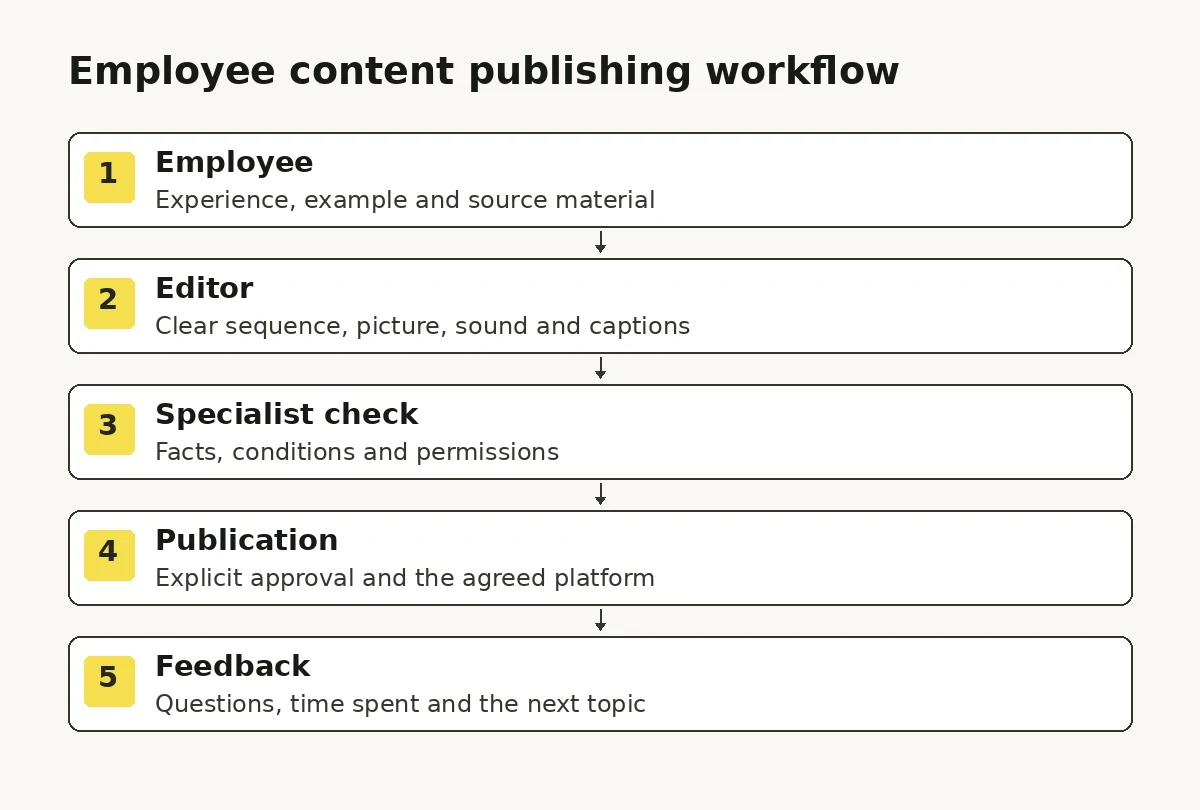
Give a reason for each revision: an incorrect fact, unclear explanation or sound or picture defect. Fix what affects accuracy and understanding first. Agree a visual template before production so it does not need to be reconsidered for every video.
How to check a disputed claim
In an illustrative situation, an employee says: “With those details, we usually prepare a proposal in two working days.” A short version becomes: “A proposal in two days.” Before publication, the editorial lead returns to the full recording and asks the service owner which details are needed and what affects the timing. The revised passage must retain verified conditions. If they remain unconfirmed, publication of that promise waits for an answer.
Separate factual review from permission to publish. A subject specialist confirms the facts, the editorial lead checks that the final video retains them and the appointed owner authorises publication. The material’s record can identify the reviewed version, its supporting source and outstanding questions. Review substantive wording changes again.
AI can help identify numbers and promises in a draft, but a person must open the source and decide. Use the content team guide to allocate roles and the training guide for practice on your own recordings.


Use AI with the company’s own material
Start with an employee explanation, approved document or transcript. AI can turn a recording into draft talking points, identify client questions, prepare subtitles and suggest short extracts. Check its output against the source.
A useful instruction is: “Suggest three short videos from this transcript. For each, give the topic, exact passage and timestamp, context to retain and a question the employee needs to clarify. Use only information in the recording.” The editor receives material they can verify.
For translation, ask the model to preserve terms, numbers and degree of certainty. A specialist checks content, then a language editor checks delivery. Adapt titles and captions for each audience when publishing Russian and English versions.
| AI task | Input | Who checks it |
|---|---|---|
| Answer prompts | Employee transcript and video brief | Employee and editor |
| Short extracts | Complete timestamped recording | Editor: meaning and context |
| Subtitles and translation | Final speech and terminology list | Specialist and language editor |
| Next-series topics | Anonymised client questions | Sales and content owner |
| Draft captions and title | Verified video content | Editor: accuracy of the promise |
Process confidential documents and personal information only in an agreed tool with suitable access settings. Anonymised material often suffices for the first pilot. Check names, amounts, dates and product claims against the original source.
If AI creates a realistic scene or meaningfully changes what a person says or does, review YouTube’s AI disclosure requirements when uploading. Agree participation, content and usage terms separately for a virtual employee likeness. Viewers should understand where the material comes from.

An example four-week pilot
In week one, choose the purpose, participants and four topics. Agree working time, reviewers and publishing platform. Try a recording with each employee to assess their preparation needs. Adjust this example schedule to the team’s availability.
In week two, prepare the briefs and record the first series. Review it together, make changes and publish the first videos. Keep the source, final version, captions and publication approval for each one.
In week three, review new questions, time spent and approval delays. Prepare the next series from those observations. One person may prefer demonstrations, another a conversation with a producer.
In week four, compare completed work with the plan. Count published videos and note which were used in client conversations. Discuss the questions they prompted and ask employees which formats they are willing to continue. Use that information to choose next month’s volume and external support.
If the team publishes three useful pieces and establishes a review process over four weeks, you have evidence for the next plan. Identify what limited the volume: preparation, editing or waiting for approval. Account for that workload before expanding.
Calculate the full cost of a video
EGC includes employee, editor, reviewer and coordinator time. Add training, equipment, tools and storage. Compare the full cost of a comparable finished video with another production method.
Consider four short videos using illustrative hours and rates. An employee spends two hours at AED 100, an editor four at AED 120, a reviewer one at AED 150 and a coordinator one at AED 100. Labour totals AED 930, or AED 232.50 per video before additional costs.
| Participant | Illustrative hours and rate | Amount |
|---|---|---|
| Employee | 2 × AED 100 | AED 200 |
| Editor | 4 × AED 120 | AED 480 |
| Reviewer | 1 × AED 150 | AED 150 |
| Coordinator | 1 × AED 100 | AED 100 |
| Total for four videos | 8 hours | AED 930 |
Add retake time if two videos have to be recorded again. Allocate one-off training costs over a chosen period and show them separately. Compare production methods using the same cost categories and a similar standard of finished video.
The iZi Media production-cost case describes a project where employee training and a production process reduced filming costs by roughly AED 9.8k per month while lead volume held. This is the site’s approximate conversion of that historical project’s ₽200,000 saving, using its stated case-study basis. The saving relates to filming for that team. Add your actual employee hours and editorial checks before comparing full production costs.
If three of four planned videos are published
Extend the previous illustrative calculation. Suppose the AED 930 of labour is followed by AED 200 for additional recording and review, AED 300 of training allocated to the period, and AED 70 for tools and storage. Every amount is hypothetical. These are neither iZi Media prices nor market estimates.
| Item for the period | Illustrative amount |
|---|---|
| Labour in the original plan | AED 930 |
| Additional recording and review | AED 200 |
| Allocated training | AED 300 |
| Tools and storage | AED 70 |
| Total included | AED 1,500 |
If three videos were published in that period, the included cost is AED 500 per published video. It also covers work on the fourth item. An allocation by video can show unfinished work separately; avoid counting the same hours twice when carrying that cost into the next period. Explain the chosen method beside the result.
Add any further costs your company incurs: equipment, external specialists, translation, management and other uncounted hours. Compare alternatives using the same cost categories, volume, quality and language requirements. Savings on camera-crew visits and changes in total production cost belong on separate lines.
Decide what to make next
Start with delivery against schedule, hours per finished video and reasons for revisions. These show whether the team can sustain the work. Then review viewing and response metrics available on each platform.
For a commercial series, record which videos sales uses and what happens after sending them. A manager might send a service-scope explanation and the client may arrive at the meeting with the required information. Save the observation alongside views. It helps assess how the video was used, although it does not by itself prove an effect on sales.
Compare long videos and short posts within their own groups. YouTube’s guidance discusses how interest differs between formats. Test the audience’s response to each type of EGC and prepare a suitable continuation.
Viewing metrics need context: topic, source, publication age and audience. See the YouTube channel audit for the detailed review process. For EGC, add the time involved and people’s willingness to continue.

What happens when an employee changes roles?
Agree where footage lives, who manages accounts and the recording’s usage terms before starting. Service pages should identify the current client contact. Update outdated video information and check the description.
Keep topics, briefs, checked facts and finished material in the company library. Assign access according to responsibilities. Use appropriate YouTube channel permissions. When the team changes, review who retains ownership and access to footage.
Questions before launching EGC
Can a small company start?
Yes. Choose one employee and a recurring topic for a pilot. Assign a reviewer, allocate time and publish several pieces to assess the effort and client response.
What if employees feel uncomfortable on camera?
Offer hands-only demonstrations, voice-over or a conversation with a colleague. A short rehearsal with a familiar example helps choose a format. See preparing an expert for filming for the process.
Do we need expensive equipment?
For a simple explanation, begin with a smartphone and check sound, light and a steady frame. Add equipment to solve a specific problem in the trial. Complex demonstrations or larger shoots need a separate production plan.
Can we publish Russian and English content from the start?
Yes, with subject and language checks for both versions. Agree terms, audience and explanation conditions. Include translation and review time in the pilot plan.
How much does an EGC launch in Dubai cost?
Pricing depends on participants, formats, training and support for the first videos. Include your own team’s time in the calculation. The iZi Media EGC page describes the scope; we agree pricing after discussing the brief.
Prepare five common client questions and choose an employee who answers them. A trial recording will show which explanations are ready and how much help is needed. Use that evidence to plan the volume and budget for the first videos.